Evaluation Visualization Experiment
Disclaimer: This post describes a personal learning experiment in data visualization. All data structures, weights, and values shown here are fictional examples created for demonstration purposes and do not reflect any actual company data. The project was run locally to ensure data privacy.
It all started because I was curious. A new evaluation tool was introduced, and I wanted to understand the data structure behind it. The visualization in the tool was quite simple, and I wondered if there was more depth to the data than what was being displayed.
Also, when filling out the evaluation, we had to use sliders. It felt a bit abstract, moving them around with a gut feeling. Yes, we had references to the levels and descriptions, but I wanted to see the underlying numbers to better understand how the final score was composed.
And then I looked at the network requests and saw the scores: Wait… there are detailed numbers behind this!
First of all what is the system?
It is a tool used to evaluate performance and give a score based on that performance. There are different categories which you grade and accordingly to the calculation in the end the correct level is displayed.
There are multiple categories:
- Dimension A
- Dimension B
- ...
And 4 groups evaluate:
- Self
- Reviewer
- Peer Group Reviewer
- Peer Group Self
The peer groups are other participants which are selected by either the reviewer or yourself.
The level which gets displayed in the end correlates to the final score.
The weights for the calculation were outlined in the documentation.
// Cluster weights
const clusterWeights = {
  "Dimension A": *.**,
  "Dimension B": *.**,
  ...
};

// Score weights
const scoreWeights = {
  "SELF": *.**,
  "REV": *.**,
  "PG-SELF": *.**,
  "PG-REV": *.**,
};

// Level hierarchy
const levelHierarchy = [
  "L1-1",
  "L1-2",
  "L1-3",
  "L2-1",
  "L2-2",
  "L2-3",
  "L3-1",
  "L3-2",
  "L3-3",
  ...
];
Understanding the Data Model
I wanted to understand how the levels were calculated to get a better sense of the progression. So I looked at the API calls and found out that in addition to the level which gets displayed, the api call also returns the scores for each category and the overall score. The scores are not displayed in the frontend, so somehow these scores have to be correlated with the levels, i.e. the textual representation.
This is an example structure of the API response:
{
  "overallScore": {
    "level": "L3-3",
    "score": 27.0
  },
  "reviewerScore": {
    "level": "L3-3",
    "score": 25.0
  },
  "selfScore": {
    "level": "L1-1",
    "score": 30.0
  },
  "peerGroupReviewerScore": {
    "level": "L1-2",
    "score": 31.0
  },
  "peerGroupSelfScore": {
    "level": "L1-1",
    "score": 30.0
  },
  "clusters": [
    {
      "type": "DIMENSION_A",
      "level": "L1-3",
      "score": 34.0
    },
    {
      "type": "DIMENSION_B",
      "level": "L1-2",
      "score": 33.0
    },
    ...
  ]
}
Now I had the issue that I did not know anything about the scores. They were in the beginning just a bunch of numbers. First I tried to find out myself what the scores mean. Somehow I knew that the scores are related to the levels, but I did not know how. I did only have a subset of the scores in my own evaluation.
I started by creating a simple table in obsidian with all the scores and levels I knew from my own evaluation. By analyzing the data points available to me, I slowly built up a picture of the correlation between scores and levels.
The Tool
Version 1
First I started putting the data into a table in obsidian. All of the scores in the json from my own evaluation I manually added to it.... That was a pain to do. But in the end it was worth it.
You need to know that there was not only 1 json. But for each group there was one json. So I needed to put in the data from 4 different jsons. To only have my evaluation in the table.
When looking at the json object it was confusing at first because the structure was not immediately clear. But I managed to extract the relevant data points.
Version 2
Now that I knew the table is working and I could get interesting data out of it, I started to think about how to visualize it even more and of course automate it.
So I started to build a website with Next.js and Tailwind. I wanted to make it as simple as possible and easy to use. But first I needed to get the data into the website. And in the beginning I choose to input the json objects manually. I did not like it but that was the best for now. And the quickest.
But now to the table. I knew that I wanted to stay with the table and not to use a chart or something like that. So I started to think about how to visualize the data in the table. I wanted to keep it simple and easy to understand. So I added a few different options to the table which could be turned on and off.
In the beginning there was only the table and no options for anything.
I made sure that all of the information is neatly displayed in the table. Everything can be compared and each score is automatically mapped to the corresponding level.
And now when I checked my analyzed points again. And I saw that there are 3 points per level. What could that mean? Could there be a good, normal and bad score? So I had to find out. I created a color coding for the points to see if they are bad or good. The normal ones I was not interested in.
But then I felt I needed to see more information. I knew there was more to it. What was the exact calculation behind it? How did the levels get calculated? So I dug out the documentation and calculated it myself based on the scores and the weights given there.
Now I was able to see the exact calculation and toggle it. And combined with the good and bad colors I could see even more.
And now I wondered what the impact of the different scores is. I could see that the reviewer has the biggest impact on the overall score. But I wanted to see how big the impact really is. And then best way to find out what the impact is, is to change the scores and see how the overall score changes. So I implemented an edit function to see what happens when I change the scores.
The important part here was to keep track what the original scores were and which fields I edited. So I could revert the changes if I wanted to.
And now let's play with the data :)
The scary part was that only changing the scores of the reviewer had an impact on the overall score. And this even without changing the levels and that is what you see in the tool. In the end changing only the reviewer to the "good" scores had a bigger impact than I expected.
Compared to doing the same for all other groups except the reviewer is a little bit wild to see.
And as a last thing I added a select option to compare the scores of any score to all of the others. This was not something that added a real big value to the tool. But it was a fun thing to implement. And you can see the differences a lot better now.
Version 3
Now lets get even more fancy. I don't know why I wanted to do this even more but I did. I added an entire homepage to the tool and added a browser extension. And this is the result.
Now lets go over the details why I did this and what the extension does.
As you may remember I need to input the data into the tool manually. And that was a pain to do. So I thought about how to automate it. And the best way to do that is to use a browser extension I thought. And I wanted to create my first browser extension.
The first thing was I needed to get the data from the API calls. What I came up with was a little new button injected into the page. This button then just triggered a clicking of other buttons :D These did the api calls and logic so I had to not do anything myself. Just intercept the api calls and get the data out of it.
This worked surprisingly well. I was able to get the data out of the API calls but now how to get it into the website?
First I was thinking about sending it to my server. But I did not want to get the data on my server. I wanted to keep it local. So I needed to find a way to get the data into the website without sending it to my server. The table was already just using client side logic. I then came up with the idea of using query parameters to pass the data into the website. Yes I know this is too sending the data to the server but since I had no logging and no other way of looking at the requests I thought that is good enough.
Now just sending the raw data was not an option. I needed to encode it in a way that is safe to pass as a query parameter. So I decided to use base64 encoding. This is a simple way to encode binary data in a way that is safe to pass as a query parameter. And I did not want to use the raw data so I came up with a new little json object to pass the data into the website.
{
  "overall": {
    "result": {
      "level": "L3-3",
      "score": 27
    },
    "dimension_a": {
      "level": "L1-3",
      "score": 34
    },
    "dimension_b": {
      "level": "L1-2",
      "score": 31
    },
    ...
  },
  "self": {
    "result": {
      "level": "L1-1",
      "score": 30
    },
    "dimension_a": {
      "level": "L1-2",
      "score": 33
    },
    "dimension_b": {
      "level": "L2-1",
      "score": 37
    },
    ...
  },
  "reviewer": {
    "result": {
      "level": "L3-3",
      "score": 25
    },
    "dimension_a": {
      "level": "L1-2",
      "score": 33
    },
    "dimension_b": {
      "level": "L1-1",
      "score": 28
    },
    ...
  },
  "peerGroupReviewer": {
    "result": {
      "level": "L1-2",
      "score": 31
    },
    "dimension_a": {
      "level": "L2-1",
      "score": 38
    },
    "dimension_b": {
      "level": "L2-1",
      "score": 37
    },
    ...
  },
  "peerGroupSelf": {
    "result": {
      "level": "L1-1",
      "score": 30
    },
    "dimension_a": {
      "level": "L1-3",
      "score": 35
    },
    "dimension_b": {
      "level": "L1-2",
      "score": 33
    },
    ...
  }
}
That is way cleaner than the previous version. Great! I added a share button to the page so you could share your visualization with others. Since the whole thing was encoded in base64 in the URL, it was easy to just copy the link. Now I can share the tool with others and they can use it to see how the scoring works. But what about the extension? What could I do with it even more?
I came up with a small little tooltip over the slider to see the exact score and the level. This was a small thing but it was a fun thing to implement. Injecting a completely new tooltip and element into an existing slider on the page. Worked really well but it was depending that the UI did not change. And that was the case.
Before the UI changes I did play around with a few more things. Like downloading and uploading previous evaluations. This later came as a own feature of the evaluation tool. Another thing was keeping track of what features the users really used. I wanted to see if it is worth the time to develop this further and what is really being used. This was just a small thing to implement. I called my server api to count up a prometheus metric when something was used. I wanted to only see the usage not any data or other details. I wanted to not log and store anything user related!
In the end I got the metrics endpoint working and I could see which features were used and which were not. And that the tool was not really used. This is over a period of 4 Months.
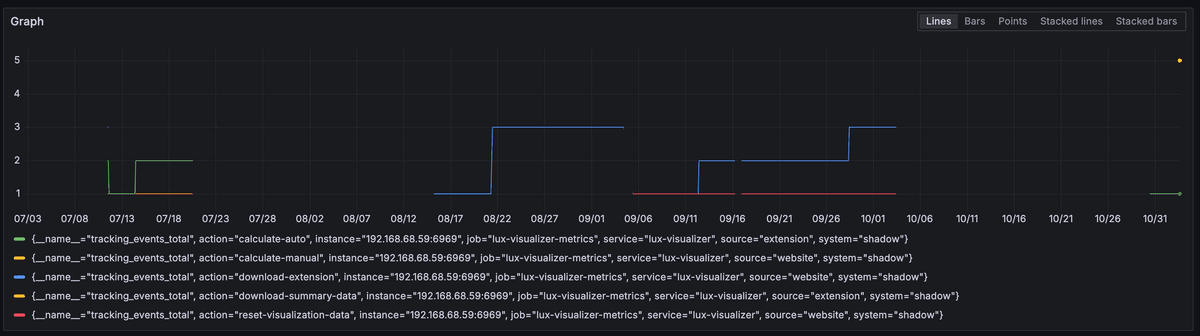
... a lot more metrics...

# HELP tracking_events_total Total number of tracking events
# TYPE tracking_events_total counter
tracking_events_total{source="website",action="download-extension"} 1
tracking_events_total{source="website",action="view-visualization"} 1

# HELP extension_version_requests_total Total number of extension version requests
# TYPE extension_version_requests_total counter
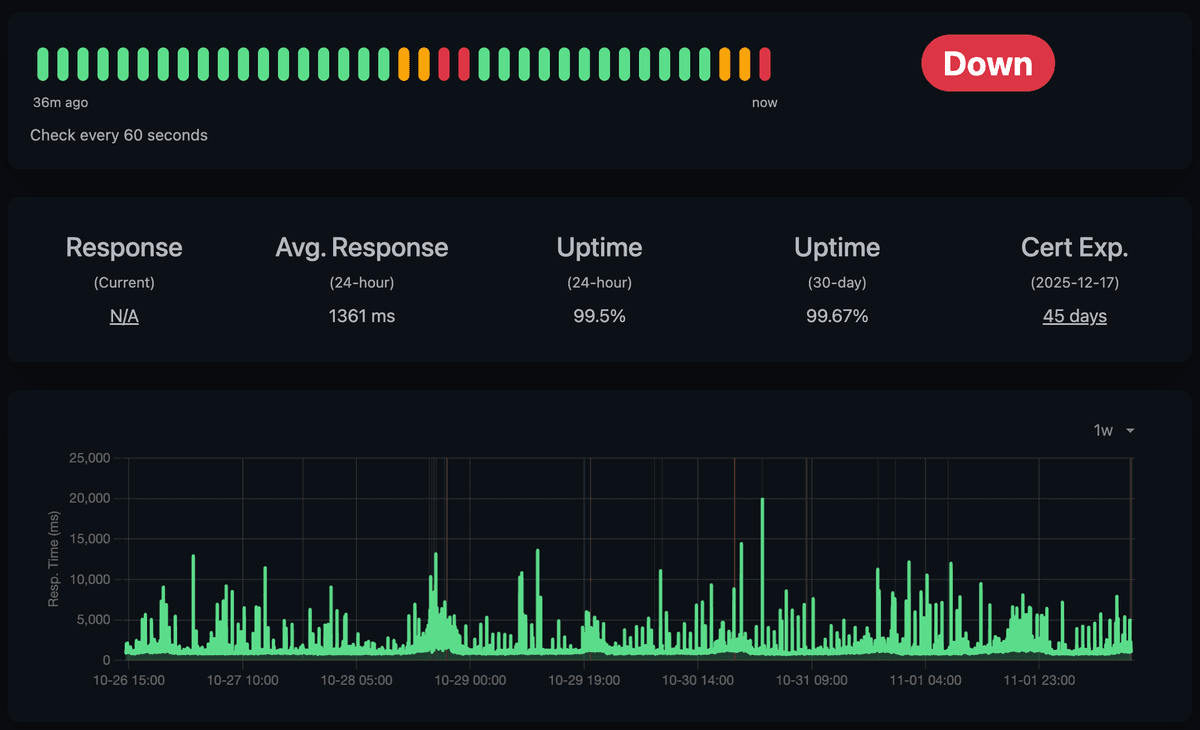
I even set up a monitoring for the uptime of the application and live status updates which got sent to my phone. As you can see it was not really stable sadly so there were a lot of messages on my phone. But this was mainly due to the fact that I enabled auto updates of the docker container and that was not a good idea. Why the response times on the other hand were so high I do not really know. But I did not really care about it since the website was not really used. And locally in my network it was not a problem. (No Shit Sherlock 😂)
Another cool little side note is that the metrics endpoint is now available publicly with my domain. I didn't want that, so I searched for a simple way to restrict it. I restricted it to a host name of 192.168.... So it returns a 403 response if it's not seeing the local IP address as the host name.
Also, the extension made a version call to the server to check for updates. If an older version was detected, a popup on the page would remind the user to update.
Conclusion
In the end, the UI of the tool changed, and the API endpoints were adjusted. This meant the extension stopped working, and I decided to shut down the project.
What did I learn from this project? It wasn't an impactful idea for the company evaluation, but it was valuable to me. I learned a lot about data analysis, visualization, and browser extensions.
And why privacy mattered: I made sure everything ran locally and no personal data was sent to my server. The only thing I tracked was usage metrics to see if the tool was actually being used.
It was a fun experiment!